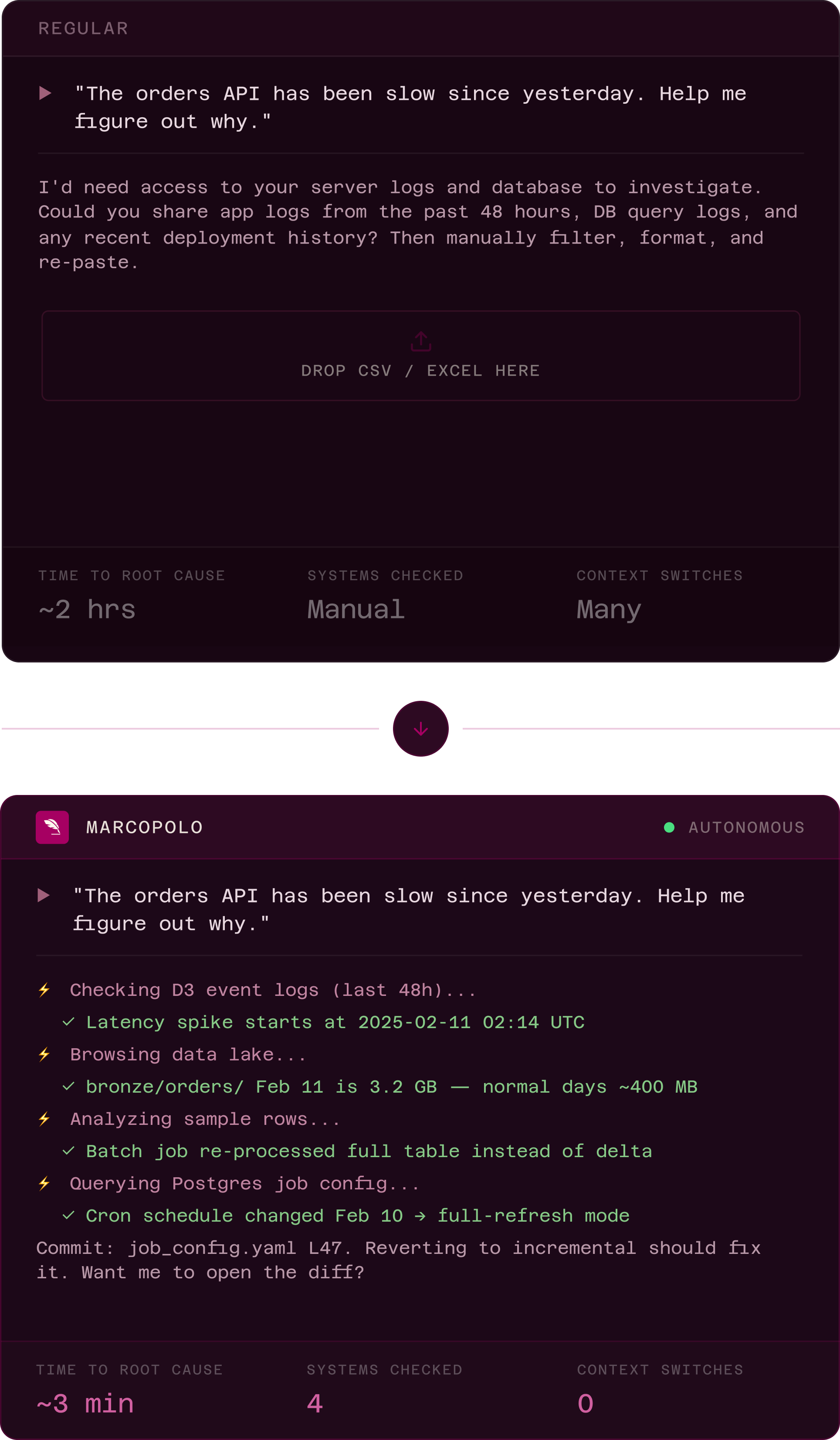
A computer in the cloud for your AI.

Your AI is connected. But real work needs more than a connection. It needs a secure workspace to query, correlate, and analyze across your real systems.

Works with

claude
chatgpt
cursor
copilot
+ any MCP client

Three steps. Live data.
One conversation.

No pipelines. No exports. No code.

01

Connect MarcoPolo to your AI client

Add MarcoPolo as an MCP server in Claude, ChatGPT, Cursor, or any MCP client. One-click auth with Google, Microsoft, GitHub, or Enterprise SSO.

02

Authorize your data sources

Select which systems your AI can access: databases, warehouses, SaaS tools, cloud storage. Set scoped permissions through the governed interface.

03

Let AI do the real work

Your AI builds and executes queries inside a secure container, iterates with live data, and returns actionable results.

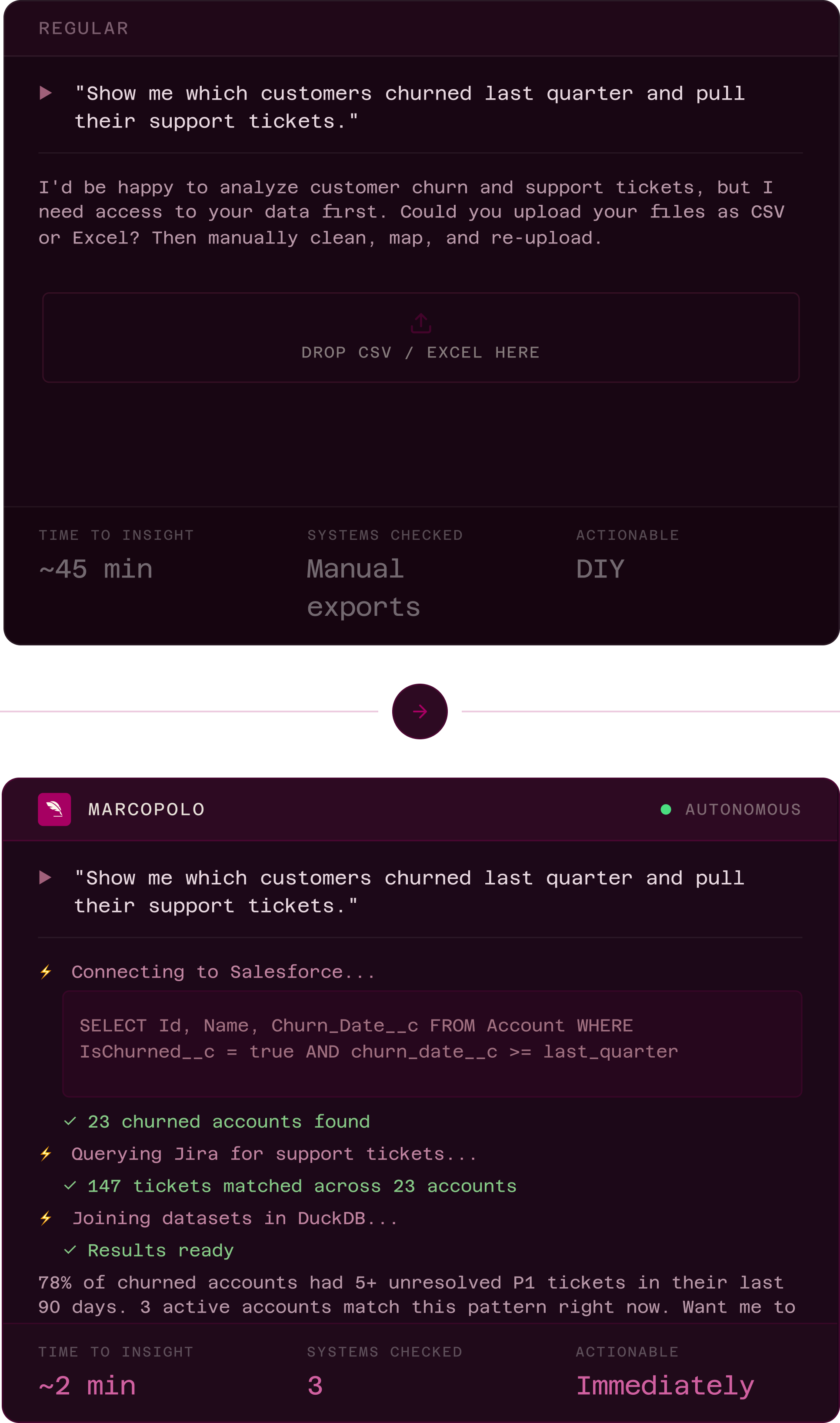
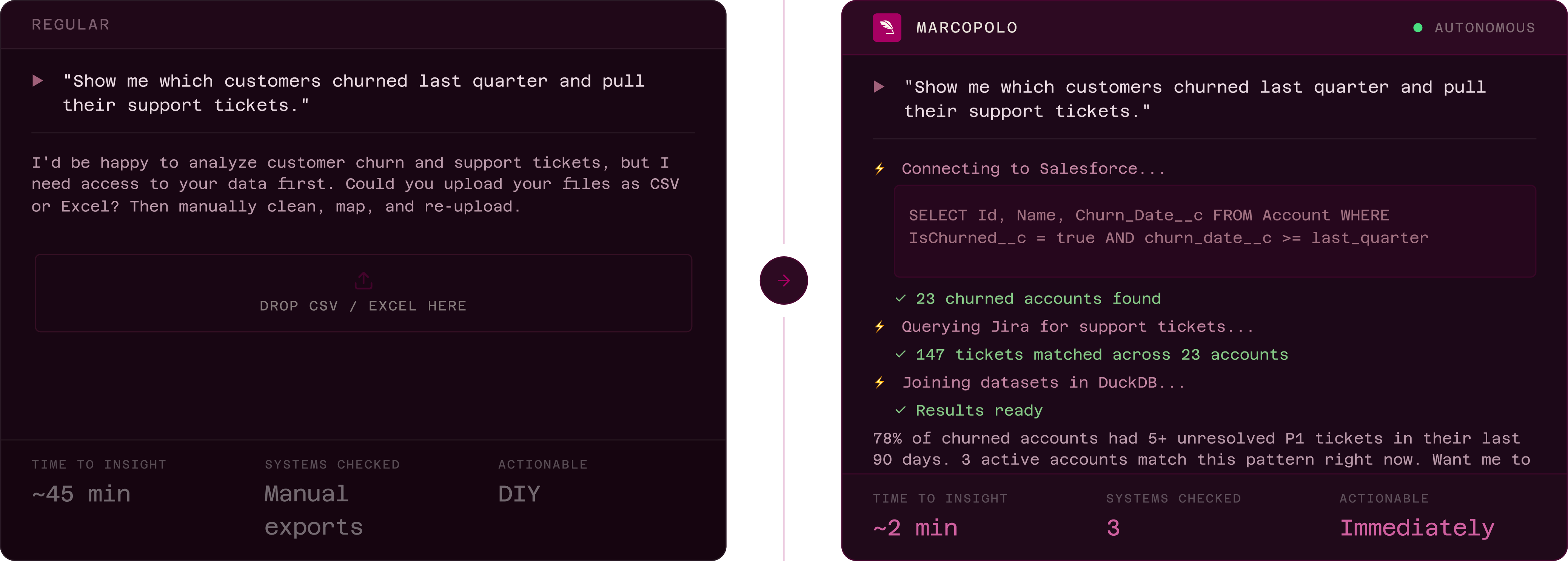
Ask questions, get useful answers.
All within a single chat with MarcoPolo.
AI ALONE
AI + MARCOPOLO
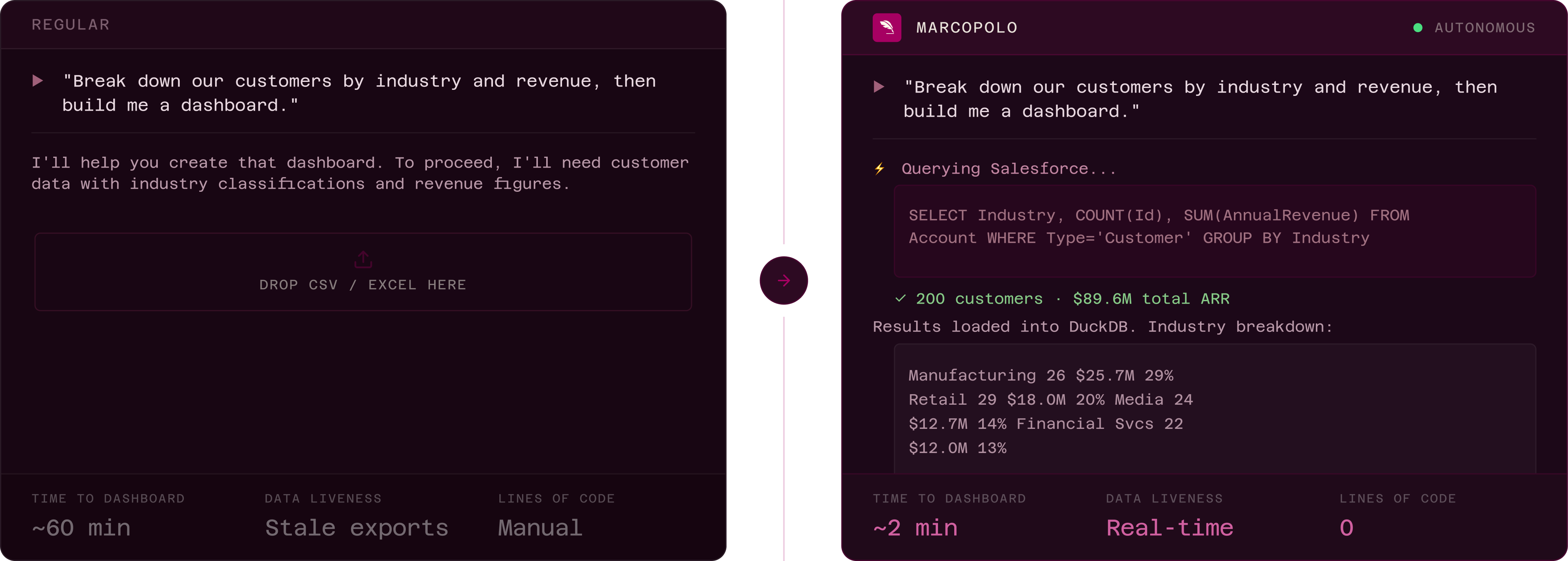
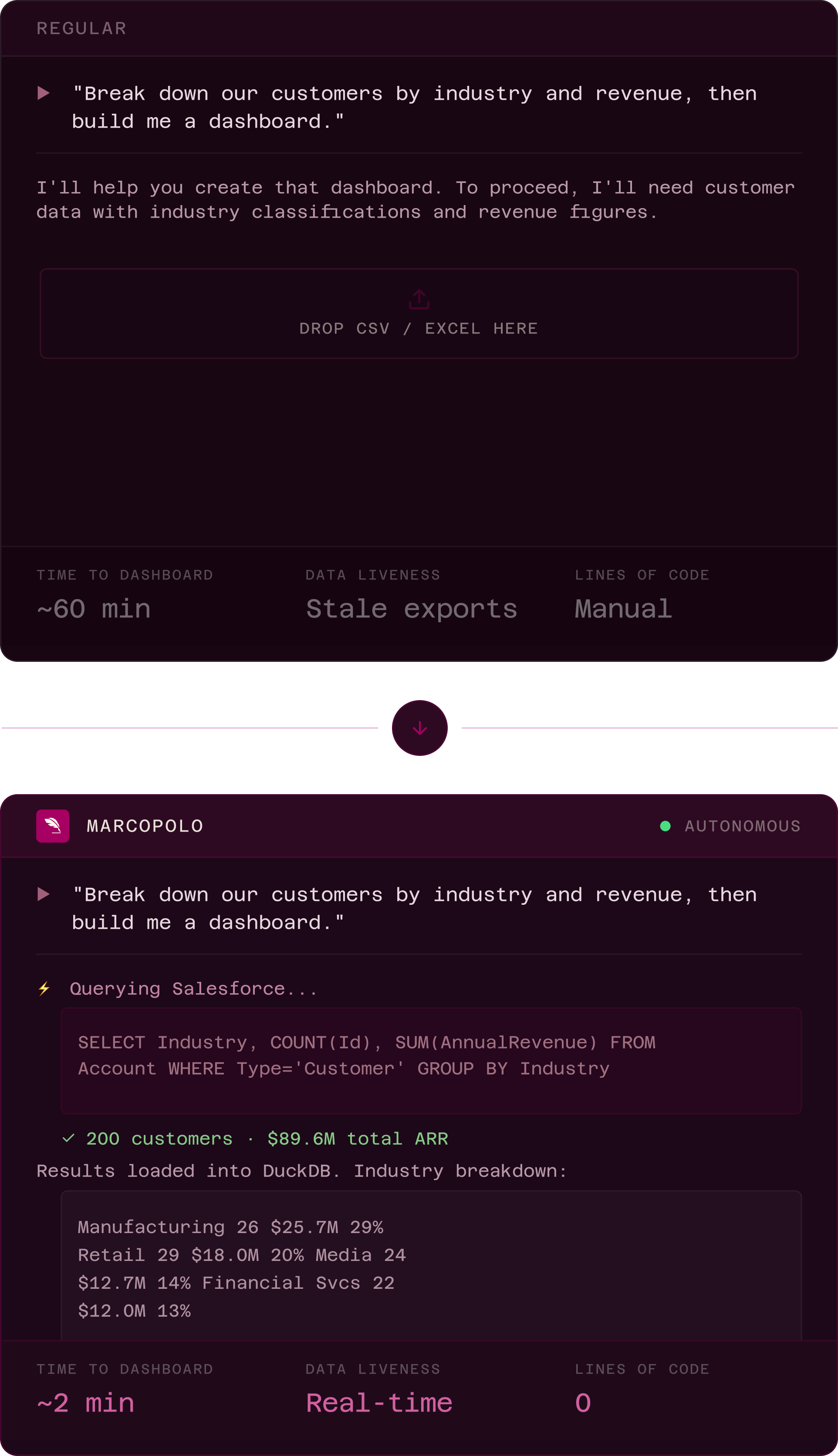
AI ALONE
AI + MARCOPOLO
Worked across
+
+
With no context switches.
AI ALONE
AI + MARCOPOLO
Worked across
+
Without context switches and built a dashboard with 0 lines of code
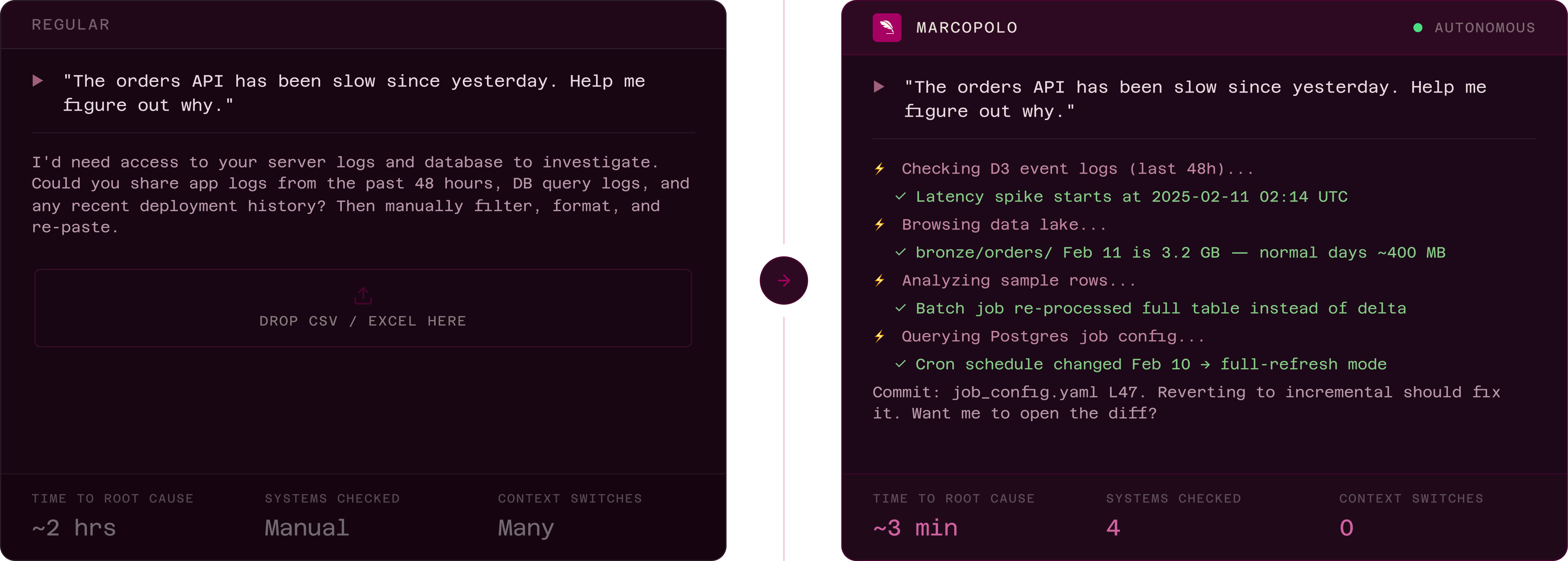
AI ALONE
AI + MARCOPOLO
Worked across
+
+
and
Without any context switches
01

Security that goes beyond an auth token.

Every AI session runs inside an isolated Kubernetes container with scoped credentials and zero data leakage.

Scoped credentials: Right access to the right data or systems based on the task at hand.

Isolated containers: Every session is a clean, sandboxed environment.

Zero leakage: No data or credentials leak to the LLM or outside your environment.

02

A workspace, not just an API.

MCP just connects, but MarcoPolo gives your AI a persistent execution environment: DuckDB for queries, Python for transforms, shell for everything else. Results persist between steps so your AI can iterate, not start over.

Cross-source joins: Combine Salesforce, Postgres, and S3 in a single query.

Persistent results: Intermediate outputs survive between steps.

Real compute: Not prompt tricks. Actual SQL execution with DuckDB.

03

Context that compounds.

MarcoPolo learns your data landscape. Schema awareness, documentation, example queries, and session history make every conversation smarter than the last.

Schema awareness: AI understands your tables, columns, and relationships

Docs + examples: Reference queries and documentation loaded automatically

Query history: Past sessions inform future ones

Two figures in red standing on a vast sandy desert with wind-swept dunes.

Choose your AI.
Connect in minutes.

Stop building integrations. Start building with your enterprise data.

Add Marco Polo as a custom Connector using Admin settings
(works only with paid Claude account):
https://mcp.marcopolo.dev
copy url
Authorize using Settings => Connectors => Marco Polo => Connect
view docs
Download and install the Marco Polo extension:
download claude desktop extension
Double-click the downloaded .mcpb file to install. Works on macOS, Windows, and Linux.
Alternative: Manual configuration
view docs
Add Marco Polo to Claude Code via MCP:
claude mcp add marcopolo --transport http https://mcp.marcopolo.dev
Copy
Authorize using/mcp => marcopolo => Authenticate
view docs
One-click installation for VS Code:
Add to vs code
After adding the server, authorize using
Command Palette => Installed Servers => Marco Polo => Start Server
view docs
Add Marco Polo to Cursor as a New MCP Server:
https://mcp.marcopolo.dev
copy url
After adding the server, authorize using Tools => Marco Polo => Connect
view docs
Add MarcoPolo directly from the ChatGPT app marketplace. One-click install with OAuth authentication.
https://mcp.marcopolo.dev
copy url
Authorize using Settings => Connectors => Marco Polo => Connect
view docs
Use this URL to connect to Marco Polo from any MCP-compatible client that supports streamable HTTP with OAuth:
https://mcp.marcopolo.dev
copy url
Requires a client that supports remote MCP servers via streamable HTTP with OAuth.
Use the MCP onboarding wizard and select 'Authentication 2.0,' and then  'Dynamic Discovery'
https://mcp.marcopolo.dev
copy url
Autentication 2.0 > Dynamic Discovery
view docs
Two figures in red standing on a vast sandy desert with wind-swept dunes.

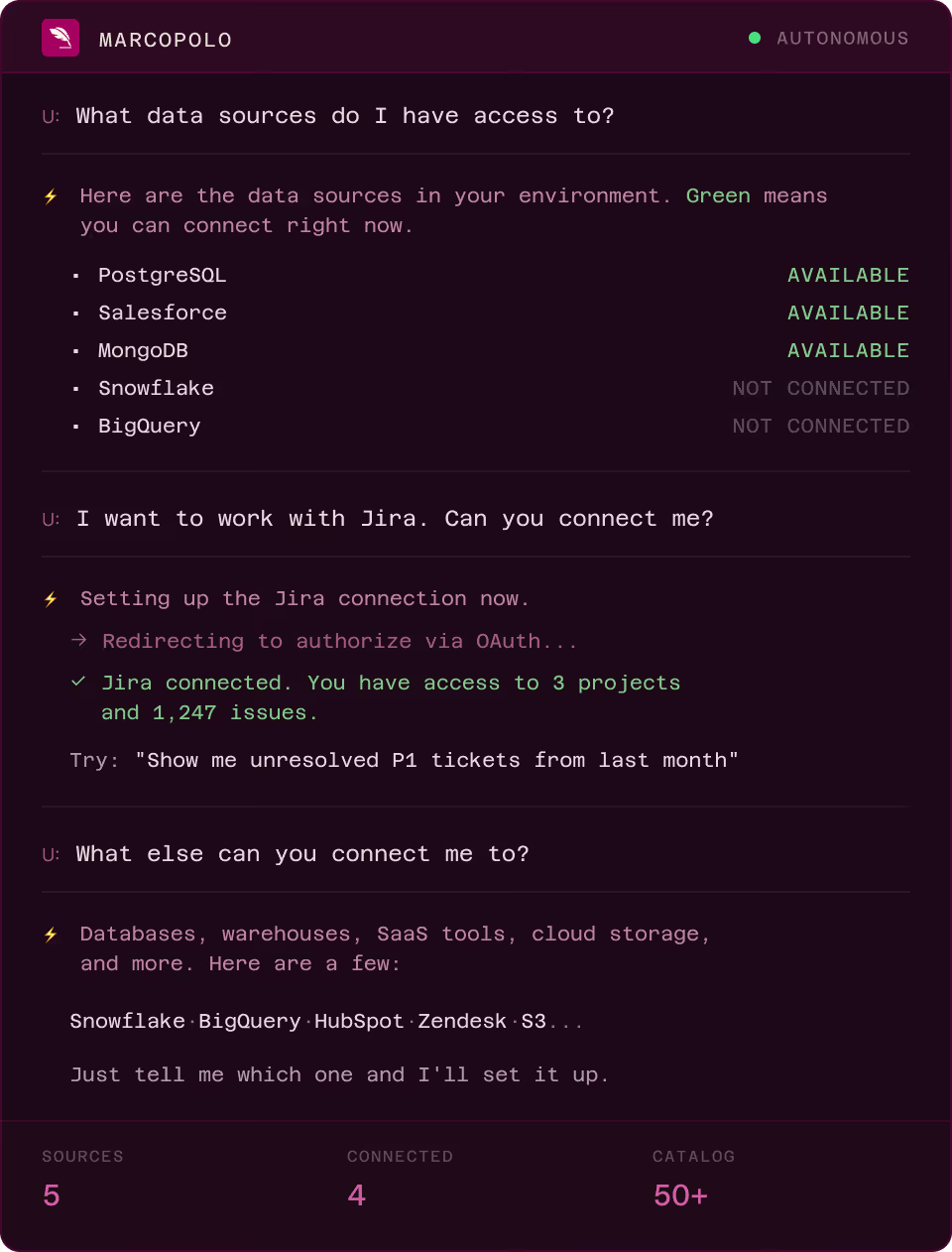
Start with a conversation, not a configuration.

No admin panel. No config files. Just ask your AI what's available, connect new sources, and start working. The same conversation where you'll get your answers.
One governed interface. Zero complexity.

Connect to what you actually use. One runtime handles execution, governance, and live context - eliminating API drift, integration sprawl, brittle pipelines and context overload.

Every system your team actually uses.

Cloud warehouses, databases, SaaS tools, and storage. All accessible through one governed interface.

Cloud Data Warehouses
Snowflake
Amazon Redshift
Google Cloud Platform icon featuring a hexagon with magnifying glass and bar chart graphics.
Google BigQuery
Icon of three stacked layers forming a hexagonal shape with an orange outline.
Databricks
Abstract blue kite with four white diamond shapes and three green diagonal lines below.
Azure Synapse
Azure SQL logo with a blue cylindrical container and white SQL text, labeled Azure SQL.
Azure SQL Database
Qubole logo.
Qubole
Blue and purple faceted diamond-shaped gem icon on black background.
TreasureData
Databases
PostgreSQL
MySQL
Red and white geometric wireframe satellite dish icon on black background.
Microsoft SQL Server
Oracle company logo in red.
Oracle
Simple green leaf icon with a central vein on a white background.
MongoDB
SQLite logo with a blue feather and blue gradient square background.
SQLite
Abstract blue and purple gradient icon resembling a stylized insect or cockroach.
CockroachDB
Blue stylized letter M logo with two angular peaks.
MemSQL
Black and white stylized text reading 'VERTICA' with a mirrored effect on the letters.
Vertica
Green circular icon with a leaf inside, symbolizing eco-friendliness.
Greenplum
Big Data & Analytics
Amazon Athena
Presto
Yellow stylized bee flying with the word 'HIVE' below it.
Hive
Minimalist black silhouette of an antelope head with curved horns on a white background.
Impala
Apache Kylin logo featuring a stylized blue squirrel inside a circular outline.
Apache Kylin
Blue icon representing sound or wireless signal with curved lines and speed motion effect.
Druid
Diagram with five vertical yellow bars of varying heights plus one small yellow square on the right, all on black background including a small red segment on the bottom left bar.
ClickHouse
Colorful overlapping organic shapes in teal, yellow, pink, and blue on white background.
Elasticsearch
Purple letter R centered between two blue square brackets on white background.
Rockset
Time Series & NoSQL
InfluxDB
Prometheus
Blue eye graphic with the text 'cassandra' beneath it.
Cassandra
Blue one-eyed cartoon monster with a smiling mouth and small arms.
ScyllaDB
Blue cylindrical database icon with horizontal segmented layers.
Amazon DynamoDB
Green 3D stylized building blocks resembling a cloud service logo.
Amazon CloudWatch
Pink outlined cloud with a magnifying glass overlapping it, symbolizing cloud monitoring or search.
CloudWatch Logs Insights
3D network of hexagonal shapes in teal and blue forming a connected pattern on a black background.
Graphite
Stylized illustration of three orange sheets or pages arranged in a fan shape inside a rounded square frame.
Axibase Time Series
SaaS & APIs
Salesforce
HubSpot
Icon of a rounded square with three vertical aligned slots above a curved smile shape inside.
Intercom
Google Analytics logo with stylized orange bar chart design.
Google Analytics
Icon of a green spreadsheet document with a table grid representing a spreadsheet file.
Google Spreadsheets
Abstract human figure composed of navy blue shapes forming a person with raised arms and three small circles above the right arm.
JIRA
Three vertical bars in a bar chart with increasing heights colored red, blue, and yellow from left to right.
Yandex Metrica
Circular icon divided horizontally with a yellow top half, a blue bottom half, and a red triangle in the center.
Yandex AppMetrica
Blue text highlighting JSON acronym with curly braces on both sides.
JSON
Three overlapping orange sheets of paper with a shadow beneath inside a rounded square border.
CSV
VIEW ALL DATA SOURCES

Loved BY Ai developers, TRUSTED by Ai Leaders

Teams shipping faster with MarcoPolo.

“We went from 45-minute manual exports to 2-minute AI-driven analysis. MarcoPolo turned our AI from a chatbot into an actual analyst.”

Jessica Mercedes

Jessica Mercedes

CEO — Franco®

“Our developers were spending hours exporting logs to debug issues. Now they ask Claude and  get root cause in minutes.”

Jessica Mercedes

Tadeusz Hemingway

founder — JIB™

“The workspace concept is what sold us. This isn’t another connector — it’s where our AI  actually thinks.”

Jessica Mercedes

Klaudia Czarna

CEO — Space®

Your databases. Your warehouses. Your systems. One conversation  away.

Give your AI the workspace it needs to go from connected to useful.